


Part 3: How to Convert your video with iSkysoft Video Converter for Mac
Step 1.Install and run iSkysoft DVD Copy for Mac (Intel Version or Power PC Version)
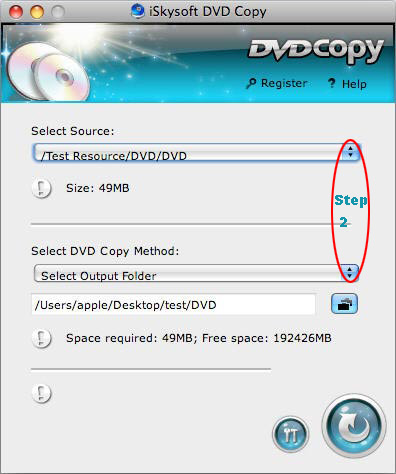
Step 2.Select the source DVD and select the DVD Copy Method.
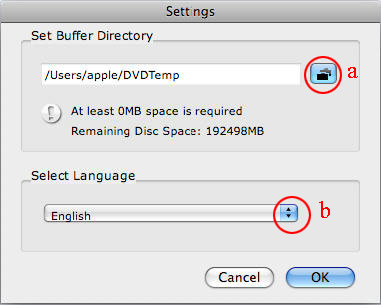
Step3.Choose the output settings.
a.Set the Buffer Dictionary
b.Select the language
Click “ok”, then the setting can be saved
Step4.Copy dvd to dvd disc on Mac
Click the “copy”button and begin to copy source DVD movie to blank DVD disc on Mac OS.
More functons of iSkysoft DVD Copy for Mac:
(1)Copy DVD at 1:1 quality.
It can clone DVD (D9 to D9, D5 to D5) with the entire movie in 1:1 ratio perfectly on Mac OS.
(2)Remove DVD protection .
iSkysoft DVD Copy for Mac can remove CSS, RC and RCE DVD protections to let you copy & burn DVD movies with no restrictions.
(3)Copy DVD golder.
It lets you copy the DVD folders of DVD movies to save them on your computer.
(4)Directly burn DVD .

 Reply With Quote
Bookmarks